Rename modes
- CSV match, sequence, find-replace, regex, prefix/suffix
- Map hundreds of filenames in one go
For photographers, e-commerce sellers, and product teams
Bulk image prep — fast, local, and predictable.
Rename, resize, convert, watermark — with a live preview before you export. No cloud. No account.
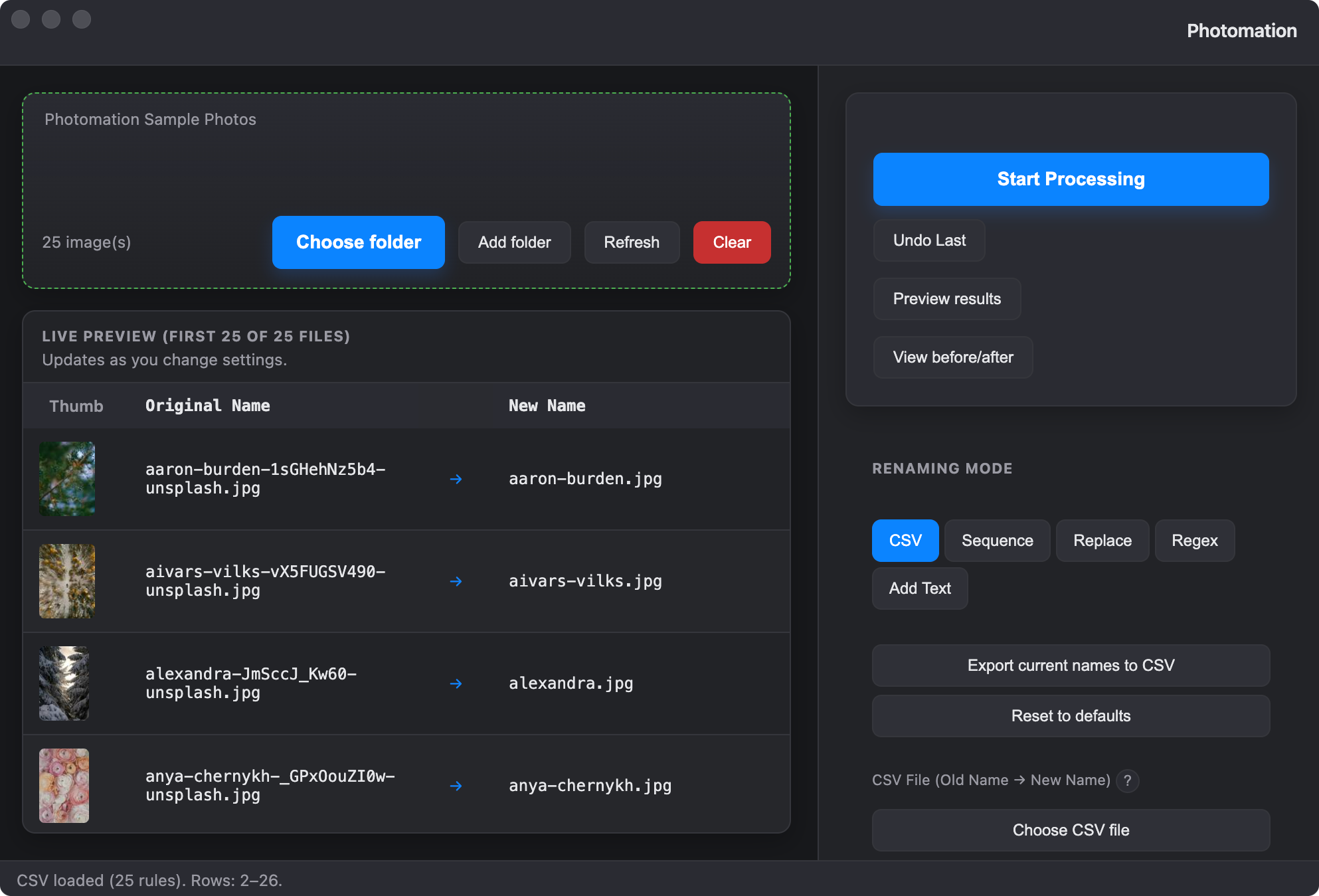
Standardise your image pipeline in one place.
Repeatable presets, predictable outputs, and a preview-first workflow.
Batch rename + resize + convert in one run—no tool-hopping.
Preview every filename and output before you run. Presets help you stay consistent.
Processing stays on-device. No analytics. License checks only when you activate.
CSV mapping, sequences, regex, RAW support—export to JPG/PNG/WebP.
Four steps to batch-ready images — preview first, export safely.
Add a folder, set your rules, then preview and export. No cloud — everything stays on your machine.
folder
CSV · sequence · find-replace · regex
crop, watermark, adjustments optional
Original → New name, then export
Rename, resize, convert, crop, watermark. Non-destructive — originals stay put; output goes to your chosen folder.
Deep dive
CSV match — Map filenames with a CSV (old name → new name). Case-insensitive; no match = keep original.
Sequence — Base name + start number + step/padding. Tokens: {date}, {index}, {width}, {height}, {original}, EXIF-based.
Find & replace — Replace fixed text in filenames; extensions stay intact.
Regex — Regular expressions with capture groups ($1, $2) for advanced renames.
Prefix & suffix — Add text to start or end of every filename.
Resize — Width, height, fit inside, fill/cover, max dimension, or by percentage.
Crop — Aspect-ratio (1:1, 16:9, 4:6, custom) or manual pixel crop.
Rotate & flip — 90°, 180°, 270°; flip horizontal or vertical.
Output format — Original, JPG, PNG, WebP. Quality and size limits. Extra outputs to multiple formats or folders.
Watermarks — Text (position, opacity) and/or image/logo (PNG/JPG, scale, position).
Adjustments — Brightness, contrast, saturation, exposure. Applied before watermark and export.
Metadata — Strip EXIF for privacy or set copyright, author, headline, description, keywords (EXIF/IPTC).
Privacy — All processing on your machine. No uploads, no cloud, no account.
Live preview — Table shows "Original → New name" for every file; updates as you change settings.
Presets & undo — Save and recall presets; undo last batch to restore filenames and output.
RAW support — Many RAW formats (.dng, .cr2, .cr3, .nef, .arw). Same batch as JPEGs.
Filters & batch control — Process first N images or by dimension; pause and resume; optional watch folder.
Built for batch‑prep workflows, not just generic conversion.
| Feature | Photomation | FastStone Photo Resizer | XnConvert |
|---|---|---|---|
| Primary focus | Batch‑prep: rename, resize, convert, crop, watermark, metadata. | Batch resize, convert, rename, basic edits, watermark. | Advanced batch conversion with many filters and actions. |
| Platform | macOS (Windows & Linux planned). | Windows only. | Windows, macOS, and Linux. |
| Pricing | One‑time $29, lifetime updates. | Free for home users. | Free. |
| Batch rename | CSV mapping, sequences, find‑replace, regex, prefixes & suffixes. | Sequences and search‑replace, limited patterns. | Solid rename, but less CSV‑centric. |
| Preview | Full “Original → New name” table before export. | Preview of images and basic settings. | Image‑level preview, not a full filename‑mapping table. |
| Watermarks | Text and logo watermarks with presets. | Text and image watermarks. | Text/image watermarks plus many effects. |
| Privacy | On‑device processing only. No uploads, no account, no analytics. | Local processing, Windows‑only. | Local processing, cross‑platform. |
Comparison based on publicly available information as of February 2026. Features and pricing may change. Always verify details on the official sites before making purchase decisions.
Photomation is designed for photographers, e‑commerce sellers, and product teams who want a simple, privacy‑first batch‑prep tool — not a complex general‑purpose converter.
One-time license. Activate with a key after purchase. Try everything free for 7 days.
Free
Try the full app free for 7 days (no card). Start the trial from the in-app activation screen.
Download trial for macOS$29 one-time
Includes lifetime updates & upgrades. Activate in-app. License keys are validated via Lemon Squeezy.
Buy licenseNo uploads. No analytics. No telemetry. All processing stays on your machine. The only outbound requests are for license activation (Lemon Squeezy) and optional update checks. Full privacy policy.
Download free. Try 7 days, no credit card. Unlock with a license when you're ready.